
Notice
Recent Posts
Recent Comments
Link
| 일 | 월 | 화 | 수 | 목 | 금 | 토 |
|---|---|---|---|---|---|---|
| 1 | 2 | 3 | 4 | 5 | 6 | |
| 7 | 8 | 9 | 10 | 11 | 12 | 13 |
| 14 | 15 | 16 | 17 | 18 | 19 | 20 |
| 21 | 22 | 23 | 24 | 25 | 26 | 27 |
| 28 | 29 | 30 |
Tags
- 벡터
- 멀티쓰레드
- 배열
- 해쉬맵
- Queue
- 리스트
- 프래그멘테이션
- map
- 반복문
- 차이점
- thread
- MonoBehaviour
- 자료구조
- vector
- 트리
- c#
- static_cast
- 스택
- 인프런
- 객체지향
- 큐
- 알고리즘
- std::unordered_map
- 힙영역
- rookiss
- 스택영역
- std::map
- 공부
- list
- 기술면접
Archives
- Today
- Total
호빵의 IT 개발소
[C#] 다차원 배열 본문
다차원 배열 예제
class Program
{
    class Map
    {   //int[5, 5] tiles 배열 생성
    	int[,] tiles = {
            {1, 1, 1, 1, 1},
            {1, 0, 0, 0, 1},
            {1, 0, 0, 0, 1},
            {1, 0, 0, 0, 1},
            {1, 1, 1, 1, 1}
        };

        public void Render()
        {
    	    ConsoleColor defaultColor = Console.ForegroundColor;

    	    for (int y = 0; y < tiles.GetLength(1); y++) //tiles.GetLength()의 위치는 int[//tiles.GetLength(1),//tiles.GetLength(0)] tiles
            {
                for (int x = 0; x < tiles.GetLength(0); x++)
                {
            	    if(tiles[y,x] == 1) //배열에 숫자가 1이라면
                	    Console.ForegroundColor = ConsoleColor.Red; //색깔을 빨간색으로 변경
                    else
                	    Console.ForegroundColor = ConsoleColor.Green; //색깔을 초록색으로 변경

            	    Console.Write("●"); //배열의 숫자를 ●로 변경
                }
                Console.WriteLine();
            }

        Console.ForegroundColor = defaultColor;
        }
    }

    static void Main(string[] args)
    {
    	Map map = new Map();
        map.Render();
    }
}
※출력
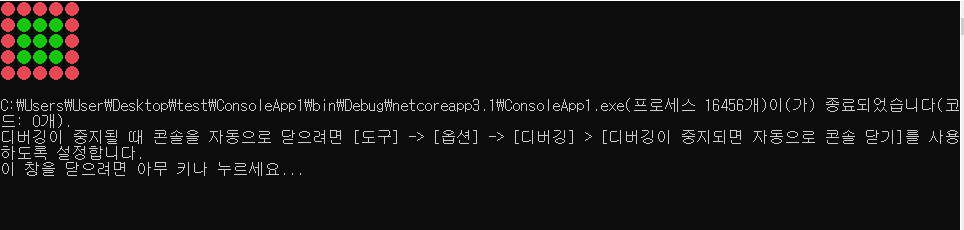
2. 다차원 배열 예제2
class Program
{
    static void Main(string[] args)
    {
    	//2층짜리 방3개 배열 고정(아래 그림 첨부)
    	int[,] map = new int[2, 3];

        //사이즈가 다른 배열 생성 (아래 그림 첨부)
        int[][] a = new int [3][];
        a[0] = new int[3];
        a[1] = new int[6];
        a[2] = new int[2];
    }
}
//고정 다차원 배열
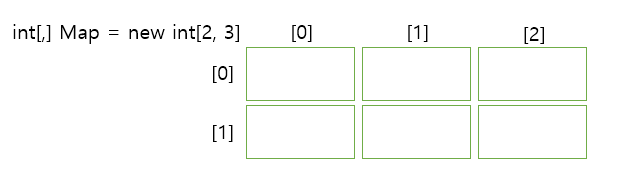
//사이즈가 다른 다차원 배열

---------------------------------------------------------------------------------------------------------------------------
참고 : [인프런] Rookiss님의 [C#과 유니티로 만드는 MMORPG 게임 개발 시리즈] Part1: C# 기초 프로그래밍 입문
'자료구조와 알고리즘' 카테고리의 다른 글
| [C#] List (0) | 2022.01.06 |
|---|
'자료구조와 알고리즘' Related Articles
more

Comments